sq inspect
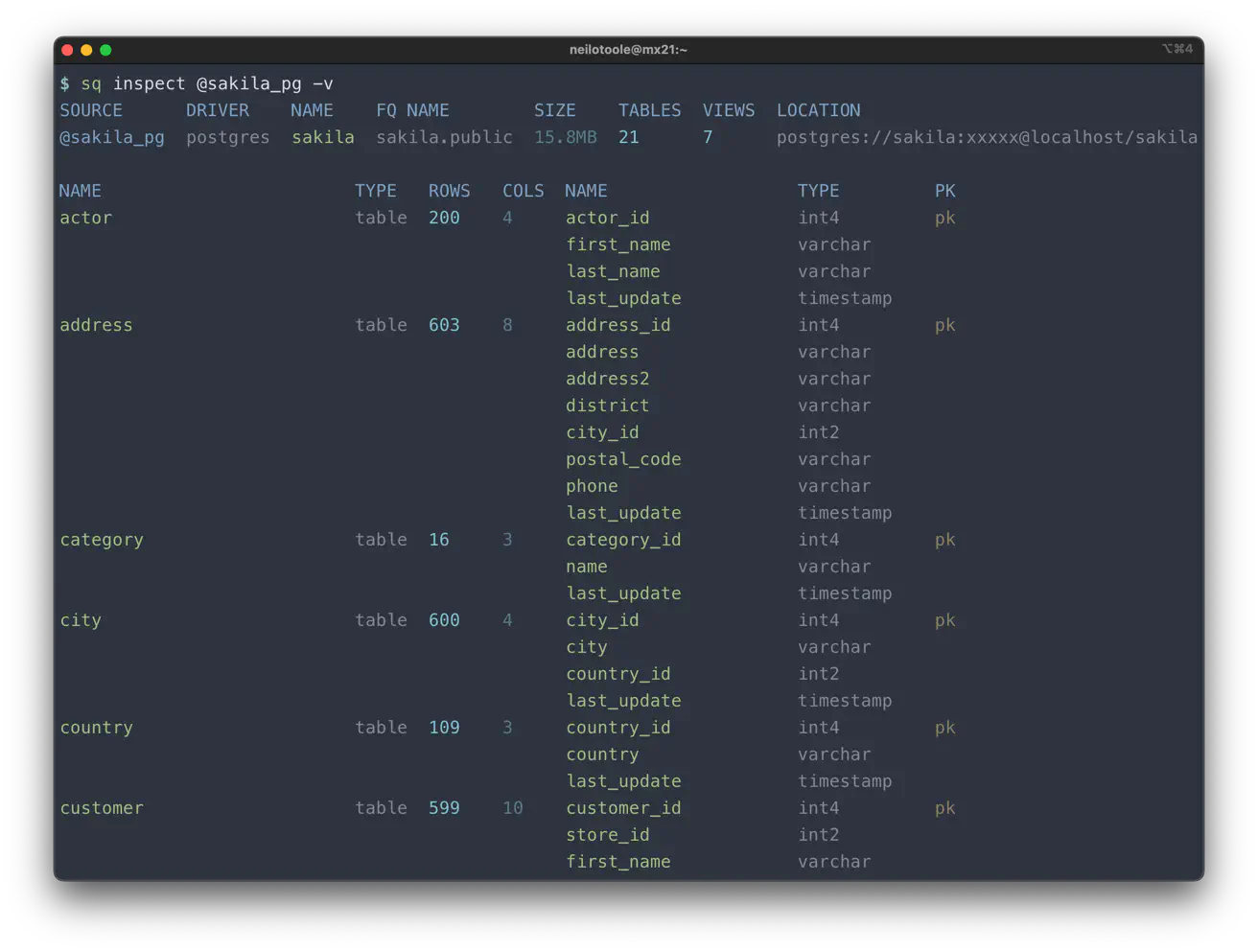
sq inspect inspects metadata (schema/structure, tables, columns) for a source,
or for an individual table. When used with --json, the output of sq inspect can
be fed into other tools such as jq to enable complex data pipelines.
See the inspect guide for an overview of sq inspect.
Reference
Inspect a data source, or a particular table in a source,
listing table details such as column names and row counts, etc.

NOTE: If a schema is large, it may take some time for the command to complete.

If @HANDLE is not provided, the active data source is assumed. If @HANDLE.TABLE
is provided, table inspection is performed (as opposed to source inspection).

There are several modes of operation, controlled by flags. Each of the following
modes apply only to source inspection, not table inspection. When no mode flag
is supplied, the default is to show the source metadata and schema.

  --overview:  Displays the source's metadata, but not the schema.

  --dbprops:   Displays database properties for the sources' *underlying* database.

  --catalogs:  List the catalogs (databases) available via the source.

  --schemata:  List the schemas available in the source's active catalog.

Use --verbose with --text format to see more detail. The --json and --yaml
formats both show extensive detail. The --markdown and --html formats each
render a schema document that includes a Mermaid entity-relationship diagram;
--html produces a standalone page (use --output to save it to a file).

Usage:
  sq inspect [@HANDLE|@HANDLE.TABLE|.TABLE]

Examples:
  # Inspect active data source.
  $ sq inspect

  # Inspect @pg1 data source.
  $ sq inspect @pg1

  # Inspect @pg1 data source, showing verbose output.
  $ sq inspect -v @pg1

  # Show output in JSON (useful for piping to jq).
  $ sq inspect --json @pg1

  # Show output in YAML.
  $ sq inspect --yaml @pg1

  # Show output as a Markdown schema doc with a Mermaid ER diagram.
  $ sq inspect --markdown @pg1

  # Show output as a standalone HTML schema doc with a Mermaid ER diagram.
  $ sq inspect --html @pg1

  # Write the HTML schema doc to a file instead of stdout.
  $ sq inspect --html @pg1 -o pg1-schema.html

  # Show only the DB properties for @pg1.
  $ sq inspect --dbprops @pg1

  # Show only the source metadata (and not schema details).
  $ sq inspect --overview @pg1

  # List the schemas in @pg1.
  $ sq inspect --schemata @pg1

  # List the catalogs in @pg1.
  $ sq inspect --catalogs @pg1

  # Inspect table "actor" in @pg1 data source.
  $ sq inspect @pg1.actor

  # Inspect "actor" in active data source.
  $ sq inspect .actor

  # Inspect a non-default schema in source @my1.
  $ sq inspect @my1 --src.schema information_schema

  # Inspect piped data.
  $ cat data.xlsx | sq inspect

Flags:
  -f, --format string              Specify output format (default "text")
  -t, --text                       Output text
  -h, --header                     Print header row (default true)
  -H, --no-header                  Don't print header row
  -j, --json                       Output JSON
  -c, --compact                    Compact instead of pretty-printed output
  -y, --yaml                       Output YAML
      --markdown                   Output a Markdown schema document
      --html                       Output a standalone HTML schema document
      --format.html.embed-assets   Embed assets (Mermaid.js) in HTML output for offline use
  -O, --overview                   Show metadata only (no schema)
  -p, --dbprops                    Show DB properties only
  -C, --catalogs                   List catalogs only
  -S, --schemata                   List schemas (in current catalog) only
      --src.schema string          Override active schema (and/or catalog) for this query
      --no-cache                   Don't cache ingest data
  -o, --output string              Write output to <file> instead of stdout
      --help                       help for inspect

Global Flags:
      --config string         Load config from here
      --debug.pprof string    pprof profiling mode (default "off")
      --error.format string   Error output format (default "text")
  -E, --error.stack           Print error stack trace to stderr
      --expand                Resolve ${scheme:path} placeholders to their underlying values
      --log                   Enable logging
      --log.file string       Log file path (default "$HOME/Library/Logs/sq/sq.log")
      --log.format string     Log output format (text or json) (default "text")
      --log.level string      Log level, one of: DEBUG, INFO, WARN, ERROR (default "DEBUG")
  -M, --monochrome            Don't print color output
      --no-progress           Don't show progress bar
      --no-redact             Don't redact passwords in output (deprecated, use --reveal)
      --reveal                Show secret values in output (don't redact passwords; print keyring values)
  -v, --verbose               Print verbose output